


Nobody budgets for tracking QA
Ask a data science team what slows them down and you'll hear the usual suspects: messy data, unclear requirements, stakeholder whiplash. Fair enough. But there's another time sink that rarely gets mentioned because it doesn't feel like "real work" — manually verifying that analytics events actually fire correctly.
Every deploy cycle, someone on the team opens Chrome DevTools, clicks through a user flow, eyeballs the Network tab, and checks whether the right events showed up with the right payloads. It's tedious. It's error-prone. And it eats way more hours than anyone wants to admit.
The problem with silent failures
Here's what makes tracking QA particularly painful: when it breaks, nothing visibly breaks. The site works fine. Users don't complain. But behind the scenes, events stop firing, required fields go missing, data types shift from strings to numbers, and third-party pixels get quietly dropped.
You don't find out until someone pulls a report two weeks later and the numbers look wrong. By then, the data gap is permanent. You can't backfill events that never fired.
We talk to data teams regularly and the pattern is consistent:
- About half of tracking issues are events that simply stopped firing after a code change
- Another 40% are missing or malformed fields in the payload
- The remaining 10% are subtler — wrong data types, casing changes, format drift
None of these throw errors. None of them show up in monitoring dashboards. They just silently corrupt your data.
What manual QA actually costs
Let's be honest about the math. A site with 30+ tracked events across multiple regions, browsers, and environments creates thousands of combinations to check. No one checks all of them. Teams spot-check the important flows and hope for the best.
That looks something like this every release cycle:
- Open DevTools on the target page
- Click through the flow (product view, add to cart, checkout)
- Search the Network tab for the right request
- Manually inspect each payload field
- Screenshot as evidence
- Cross-reference with whatever analytics platform you're using
- Repeat for every region and browser combination you have time for
- File a ticket if something looks off
Realistically, this takes 2-4 hours per validation cycle. And because it's manual, coverage sits around 30% at best. The other 70% is trust and luck.
Here's the part that stings: every hour spent in DevTools is an hour not spent on actual analysis. Data scientists didn't sign up to be QA engineers for tracking implementations. But someone has to do it, and it usually falls on the people who understand the data best.
Why this gets worse over time
Tracking implementations aren't static. New events get added. Existing events get modified. Third-party scripts update themselves without warning. Marketing asks for new UTM parameters. The consent management platform changes behavior.
Each change is a new surface area for breakage. And because the QA is manual, the gap between what's tested and what's deployed keeps growing. Teams that were keeping up six months ago are now drowning, and they can't always explain why — it just takes longer to validate everything.
Multi-region and multi-brand setups make this exponentially worse. An event that works fine on the US site might be broken on the UK site because of a locale-specific code path nobody thought to check.
What automated validation looks like
The fix isn't hiring more people to stare at DevTools. It's automating the validation itself.
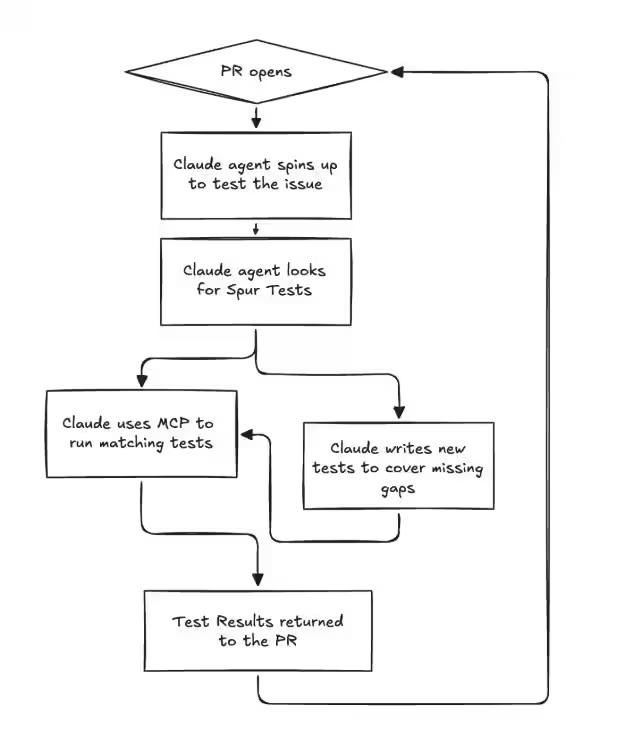
Spur replaces the manual DevTools workflow with an AI agent that runs a real browser, performs user flows exactly like a human would, captures all network traffic, and validates event payloads against your expectations. You describe what to check in plain language — "confirm the purchase event contains order_id, revenue as a number, and items as an array" — and the agent handles finding the request, parsing the payload, and reporting pass/fail with the actual data it found.
The same validation that takes a person 2-4 hours runs in under 10 minutes. Every field gets checked, every time. Across Chrome, Safari, and mobile. Across regions. In parallel.
You schedule it to run after every deploy, or daily, or both. When something breaks, you know within minutes — not two weeks later when a report looks wrong.
Where to start
If you're on a data team dealing with this, start with the one event that would cause the most damage if it broke. For most teams that's the purchase or order confirmation event — it's tied directly to revenue attribution and commission payouts.
Document what "correct" looks like: the event name, every required field, expected data types, format rules. Then automate that single check and schedule it to run on every deploy.
Once that's solid, expand to your next highest-priority event. Within a few weeks you'll have automated coverage over the flows that matter most, and your team can get back to the work they were actually hired to do.
The real cost isn't the hours
The hours matter, yes. But the bigger cost is what happens when broken tracking goes undetected. Bad data leads to bad dashboards, which leads to bad decisions. Attribution models trained on incomplete data misallocate budget. A/B tests with corrupted event data produce meaningless results.
Most data teams have experienced this at least once — the sinking feeling of realizing that a key metric has been wrong for weeks because an event silently stopped firing. That's the real tax. And it's entirely preventable.








.avif)